Pages

Bài đăng phổ biến

Saturday, September 28, 2024

How to create a bot to automate daily tasks using Slack

How to create a bot to automate daily tasks using Slack

Nguyen Si Nhan


1. Setting Up Your Slack App
  • Create a Slack App: Sign in to your Slack workspace and head over to https://api.slack.com/quickstart. Choose "From Scratch" and give your app a descriptive name. Click "Create App."
  • Configure OAuth & Permissions: Navigate to the "OAuth & Permissions" section and then "Bot User OAuth Token." Grant your bot the following scopes:
    • channels:history - Access past messages in channels.
    • chat:write - Allow the bot to post messages in channels.
    • commands - Enable the bot to respond to slash commands.
    • groups:history (Optional) - Access past messages in private channels (groups).
    • im:history, im:read, im:write (Optional) - Allow interaction with Direct Messages (DMs).
    • incoming-webhook - Enable receiving messages from webhooks.
  • Optional: User Token Scopes - Define additional permissions for users interacting with the bot, such as channels:read for viewing messages in channels.
  • Restrict API Token Usage (Optional): For added security, consider restricting where your API tokens can be used.
  • Event Subscriptions: Configure URLs for receiving real-time events from Slack. You'll define these URLs in your code (explained in step 2). Here's an example URL: https://automation.0937686468.com/slack/events.

2. Automation Bot Code:

The code for your automation bot can be found here: https://github.com/nhannguyensy/automation-bot-v2/tree/master 

This guide provides a basic framework for setting up your Slack bot. You can customize the code further to automate specific tasks according to your needs.

And the picture below is the result after you finish: 


Thursday, January 12, 2023

[ Solved ] : hudson.remoting.ProxyException: io.fabric8.kubernetes.client.KubernetesClientException: No httpclient implementations found on the context classloader, please ensure your classpath includes an implementation jar

With this error: hudson.remoting.ProxyException: io.fabric8.kubernetes.client.KubernetesClientException: No httpclient implementations found on the context classloader, please ensure your classpath includes an implementation jar 

You can resolve by install this plugin : Pipeline: GitHub Groovy Libraries .


Finish ! 

Tuesday, January 10, 2023

[ Linux ] : Bash script

# Create folder named with month : 
printf '%s\n' {1..12}/01 | xargs -I {} date -d {} +%b | xargs mkdir --
# Create folder named with day:
cd Jan && for i in {1..31} ; do mkdir -p $i; done && cd .. && cd Feb && for i in {1..28} ; do mkdir -p $i; done && cd .. && cd Mar && for i in {1..31} ; do mkdir -p $i; done && cd .. && cd Apr && for i in {1..31} ; do mkdir -p $i; done && cd .. && cd May && for i in {1..31} ; do mkdir -p $i; done && cd .. && cd Jun && for i in {1..30} ; do mkdir -p $i; done && cd .. && cd Jul && for i in {1..31} ; do mkdir -p $i; done && cd .. && cd Aug && for i in {1..31} ; do mkdir -p $i; done && cd .. && cd Sep && for i in {1..30} ; do mkdir -p $i; done && cd .. && cd Oct && for i in {1..31} ; do mkdir -p $i; done && cd .. && cd Nov && for i in {1..30} ; do mkdir -p $i; done && cd .. && cd Dec && for i in {1..31} ; do mkdir -p $i; done && cd ..


Wednesday, January 4, 2023

How to stop an automatic redirect from “http://” to “https://” in Google Chrome

For example :

 If You want to access this url http://test.example.com.vn/everything : you will type url in Google Chrome like that: test.example.com.vn/everything but Chrome auto switch to https://test.example.com.vn/everything but your server didn't open port 443 for subdomain : test.example.com.vn so It will return :Failed .

To resolve this problem : 

1. you go to : chrome://net-internals/#hsts


2. then you query domain example.com.vn it will show results like below example  :


Note : you don't need to query subdomain: test.example.com.vn  , only domain not subdomain .

3. Input domain example.com.vn into below box : "Delete domain security policies" then click to Delete ,Done ! 


That's All ! 


Wednesday, December 28, 2022

PRINCIPLES OF CHAOS ENGINEERING

PRINCIPLES OF CHAOS ENGINEERING

Last Update: 2019 March (changes)

Chaos Engineering is the discipline of experimenting on a system in order to build confidence in the system’s capability to withstand turbulent conditions in production.

Advances in large-scale, distributed software systems are changing the game for software engineering. As an industry, we are quick to adopt practices that increase flexibility of development and velocity of deployment. An urgent question follows on the heels of these benefits: How much confidence we can have in the complex systems that we put into production?

Even when all of the individual services in a distributed system are functioning properly, the interactions between those services can cause unpredictable outcomes. Unpredictable outcomes, compounded by rare but disruptive real-world events that affect production environments, make these distributed systems inherently chaotic.

We need to identify weaknesses before they manifest in system-wide, aberrant behaviors. Systemic weaknesses could take the form of: improper fallback settings when a service is unavailable; retry storms from improperly tuned timeouts; outages when a downstream dependency receives too much traffic; cascading failures when a single point of failure crashes; etc. We must address the most significant weaknesses proactively, before they affect our customers in production. We need a way to manage the chaos inherent in these systems, take advantage of increasing flexibility and velocity, and have confidence in our production deployments despite the complexity that they represent.

An empirical, systems-based approach addresses the chaos in distributed systems at scale and builds confidence in the ability of those systems to withstand realistic conditions. We learn about the behavior of a distributed system by observing it during a controlled experiment. We call this Chaos Engineering.

CHAOS IN PRACTICE

To specifically address the uncertainty of distributed systems at scale, Chaos Engineering can be thought of as the facilitation of experiments to uncover systemic weaknesses. These experiments follow four steps:

  1. Start by defining ‘steady state’ as some measurable output of a system that indicates normal behavior.
  2. Hypothesize that this steady state will continue in both the control group and the experimental group.
  3. Introduce variables that reflect real world events like servers that crash, hard drives that malfunction, network connections that are severed, etc.
  4. Try to disprove the hypothesis by looking for a difference in steady state between the control group and the experimental group.

The harder it is to disrupt the steady state, the more confidence we have in the behavior of the system. If a weakness is uncovered, we now have a target for improvement before that behavior manifests in the system at large.

ADVANCED PRINCIPLES

The following principles describe an ideal application of Chaos Engineering, applied to the processes of experimentation described above. The degree to which these principles are pursued strongly correlates to the confidence we can have in a distributed system at scale.

Build a Hypothesis around Steady State Behavior

Focus on the measurable output of a system, rather than internal attributes of the system. Measurements of that output over a short period of time constitute a proxy for the system’s steady state. The overall system’s throughput, error rates, latency percentiles, etc. could all be metrics of interest representing steady state behavior. By focusing on systemic behavior patterns during experiments, Chaos verifies that the system does work, rather than trying to validate how it works.

Vary Real-world Events

Chaos variables reflect real-world events. Prioritize events either by potential impact or estimated frequency. Consider events that correspond to hardware failures like servers dying, software failures like malformed responses, and non-failure events like a spike in traffic or a scaling event. Any event capable of disrupting steady state is a potential variable in a Chaos experiment.

Run Experiments in Production

Systems behave differently depending on environment and traffic patterns. Since the behavior of utilization can change at any time, sampling real traffic is the only way to reliably capture the request path. To guarantee both authenticity of the way in which the system is exercised and relevance to the current deployed system, Chaos strongly prefers to experiment directly on production traffic.

Automate Experiments to Run Continuously

Running experiments manually is labor-intensive and ultimately unsustainable. Automate experiments and run them continuously. Chaos Engineering builds automation into the system to drive both orchestration and analysis.

Minimize Blast Radius

Experimenting in production has the potential to cause unnecessary customer pain. While there must be an allowance for some short-term negative impact, it is the responsibility and obligation of the Chaos Engineer to ensure the fallout from experiments are minimized and contained.

Chaos Engineering is a powerful practice that is already changing how software is designed and engineered at some of the largest-scale operations in the world. Where other practices address velocity and flexibility, Chaos specifically tackles systemic uncertainty in these distributed systems. The Principles of Chaos provide confidence to innovate quickly at massive scales and give customers the high quality experiences they deserve.

Join the ongoing discussion of the Principles of Chaos and their application in the Chaos Community.

Source: https://principlesofchaos.org/ 

Tuesday, December 27, 2022

[ k8s ] frequently used commands in kubenetes

- cmd to show nodes taint
kubectl get nodes -o json | jq '.items[].spec.taints'
- remove or untaint a node
kubectl taint nodes node1 key1=value1:NoSchedule-
- cordon all node 
kubectl get nodes | awk '{if (NR!=1) {print $1}}' | xargs -I {} kubectl cordon {}
- Kubectl autocomplete : 

source <(kubectl completion bash) # set up autocomplete in bash into the current shell, bash-completion package should be installed first.
echo "source <(kubectl completion bash)" >> ~/.bashrc # add autocomplete permanently to your bash shell.
alias k=kubectl
complete -o default -F __start_kubectl k

- Get all pods in a node : 

kubectl get pods --all-namespaces -o wide --field-selector spec.nodeName=<nodename> 


Thursday, December 22, 2022

[spinnaker export pipeline template] TypeError: Cannot read property 'value' of undefined.

export pipeline template with error : 

TypeError: Cannot read property 'value' of undefined.

You can fixed it by run hal config as below : 

hal config features edit --pipeline-templates true
hal config features edit --managed-pipeline-templates-v2-ui true

then apply them by : 

hal deploy apply .

Done! 

Friday, November 18, 2022

Create shortlink with custom domain with firebase dynamic link by curl

curl  'https://firebasedynamiclinks.googleapis.com/v1/shortLinks?key=xxxx' --header 'Content-Type: application/json' --data '
{
"dynamicLinkInfo": {
"domainUriPrefix":"https://yourdomain",
"link":"https://yourlinkyouwant_to_redirectto",
     "analyticsInfo": {
      "googlePlayAnalytics": {
        "utmSource": "nhannguyen",
        "utmMedium": "test",
        "utmCampaign": "smartpos"
      }
    },
},
  "suffix": {
    "option": "SHORT"
  }
}'

Monday, November 7, 2022

Solved: [ kubernetes ] client intended to send too large body

To set client_max_body_size in ingress-nginx-controller you must add more this line to yaml file like that: 

apiVersion: networking.k8s.io/v1
kind: Ingress
metadata:
  annotations:
    nginx.ingress.kubernetes.io/proxy-body-size: "20m"
.......


Note: 

1. 20m ~ 20MB and no need restart nginx pod .
2. some template yaml have added this line to annotations : ingress.kubernetes.io/proxy-body-size: "<valuem>" but it is not enough you must add this line : nginx.ingress.kubernetes.io/proxy-body-size there is nginx in the first line .

Sunday, October 9, 2022

Upgrade nginx on the fly - no downtime

          #first please check pid file by:

          cat /var/run/nginx.pid  

#copy new binary to /sbin/nginx and force overwrite if you don't use option "-f" you will see this error : 
cp: cannot create regular file ‘/sbin/nginx’: Text file busy
/bin/cp -f nginx /sbin/nginx 

#spawn a new nginx master/workers set

kill -s USR2 `cat /var/run/nginx.pid`

#check process

ps aux | grep nginx

# check pid 

tail -n +1 /var/run/nginx.pid*

#shut down the old master's worker

kill -s WINCH `cat /var/run/nginx.pid.oldbin`

#check 
ps aux | grep nginx

safely shut down the old master process

kill -s QUIT `cat /var/run/nginx.pid.oldbin`

Solved : ./configure: error: the Google perftools module requires the Google perftools library


./configure: error: the Google perftools module requires the Google perftools
library. You can either do not enable the module or install the library.

to fix above error run this cmd:
yum install gperftools-devel


Saturday, October 8, 2022

Understanding naxsilogs

NAXSI_FMT

NAXSI_FMT are outputed by naxsi in your errorlog :

2013/11/10 07:36:19 [error] 8278#0: *5932 NAXSI_FMT: ip=X.X.X.X&server=Y.Y.Y.Y&uri=/phpMyAdmin-2.8.2/scripts/setup.php&learning=0&vers=0.52&total_processed=472&total_blocked=204&block=0&cscore0=$UWA&score0=8&zone0=HEADERS&id0=42000227&var_name0=user-agent, client: X.X.X.X, server: blog.memze.ro, request: "GET /phpMyAdmin-2.8.2/scripts/setup.php HTTP/1.1", host: "X.X.X.X"

Here, client X.X.X.X request to server Y.Y.Y.Y did trigger the rule 42000227 in the var named user-agent in theHEADERS zone. id X might seem obscure, but you can see the meaning in naxsi_core.rules:

MainRule "str:<" "msg:html open tag" "mz:ARGS|URL|BODY|$HEADERS_VAR:Cookie" "s:$XSS:8" id:1302;

NAXSI_FMT is composed of different items :

  • ip : Client's ip
  • server : Requested Hostname (as seen in http header Host)
  • uri: Requested URI (without arguments, stops at ?)
  • learning: tells if naxsi was in learning mode (0/1)
  • vers : Naxsi version, only since 0.51
  • total_processed: Total number of requests processed by nginx's worker
  • total_blocked: Total number of requests blocked by (naxsi) nginx's worker
  • zoneN: Zone in which match happened (see "Zones" in the table below)
  • idN: The rule id that matched
  • var_nameN: Variable name in which match happened (optional)
  • cscoreN : named score tag
  • scoreN : associated named score value

Several groups of zone, id, var_name, cscore and score can be present in a single line.

NAXSI_EXLOG

NAXSI_EXLOG is a complement to naxsilogs. Along with exceptions, it contains actual content of the matched request. While NAXSI_FMT only contains IDs and location of exception, NAXSI_EXLOG provides actual content, allowing you to easily decide if it's a false positive or not.

Learning tools uses this at his advantage. Extensive log is enabled by adding the following line in your server {} section but out of your location.

set $naxsi_extensive_log 1;

This feature is provided by runtime-modifiers.

2013/05/30 20:47:05 [debug] 10804#0:*1 NAXSI_EXLOG: ip=127.0.0.1&server=127.0.0.1&uri=/&id=1302&zone=ARGS&var_name=a&content=a<>bcd
2013/05/30 20:47:05 [error] 10804#0:*1 NAXSI_FMT: ip=127.0.0.1&server=127.0.0.1&uri=/&learning=0&vers=0.50&total_processed=1&total_blocked=1&zone0=ARGS&id0=1302&var_name0=a, client: 127.0.0.1, server: , request: "GET /?a=a<>bcd HTTP/1.0", host: "127.0.0.1"

Naxsi Internal IDs

"User defined" rules are supposed to have IDs > 1000.

IDs inferior 1000 are reserved for naxsi internal rules, which are usually related to protocol sanity and things that cannot be expressed through regular expressions or string matches.

Think twice before whitelisting one of those IDs, as it might partially/totally disable naxsi.


Reference: https://github.com/nbs-system/naxsi/wiki/naxsilogs

Tuesday, October 4, 2022

Solved: utils/geo_lookup.cc:131:32: error: invalid conversion from ‘const MMDB_s’ to ‘MMDB_s’ [-fpermissive]

If you see this error when you compiled Modsecurity :

utils/geo_lookup.cc:131:32: error: invalid conversion from ‘const MMDB_s’ to ‘MMDB_s’ [-fpermissive]

because you are using old lib of maxminddb to solved it you should manual compile libmaxminddb from https://github.com/maxmind/libmaxminddb/releases: 

 sudo ./configure
sudo  make
 sudo make check
 sudo make install
 sudo ldconfig

Then you compile Modsecurity again, it should be ok .

Solved: libtoolize: command not found

Solved: 
yum install libtool 

Sunday, October 2, 2022

Solved: python error: ImportError: No module named elasticsearch

you need run below command : 
pip install elasticsearch 

That's all !  


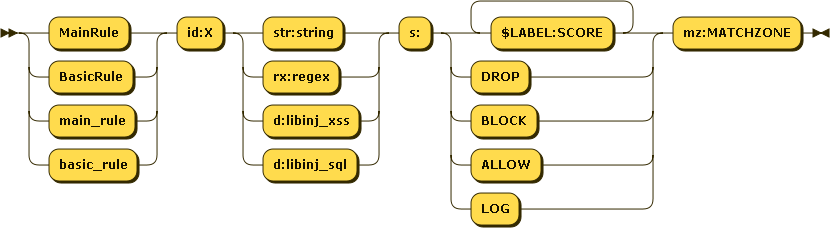
Understanding naxsi rules

Rules are meant to search for patterns in parts of a request to detect attacks.

ie. DROP any request containing the string 'zz' in any GET or POST argument : MainRule id:424242 "str:zz" "mz:ARGS|BODY" "s:DROP";

Rules can be present at location level (BasicRule) or at http level (MainRule).

Rules have the following schema :

Everything must be quoted with double quotes, except the id part.

ID (id:...)

id:num is the unique numerical ID of the rule, that will be used in NAXSI_FMT or whitelists.

IDs inferior to 1000 are reserved for naxsi internal rules (protocol mismatch etc.)

Match Pattern

Match pattern can be a regular expression, a string match, or a call to a lib (libinjection) :

  • rx:foo|bar : will match foo or bar
  • str:foo|bar : will match foo|bar
  • d:libinj_xss : will match if libinjection says it's XSS (>= 0.55rc2)
  • d:libinj_sql : will match if libinjection says it's SQLi (>= 0.55rc2)

Using plain string match when possible is recommended, as it's way faster. All strings must be lowercase, since naxsi's matches are case insensitive.

Score (s:...)

s is the score section. You can create "named" counters: s:$FOOBAR:4 will increase counter $FOOBAR value by 4. One rule can increase several scores: s:$FOO:4,$BAR:8 will increase both $FOO by 4 and $BAR by 8. A rule can as well directly specifiy an action such a BLOCK (blocks the request in non-learning mode) or DROP (blocks the request even in learning mode) Named scores are later handled by CheckRules.

MatchZone (mz:...)

Please refer to Match Zones for details.

mz is the match zone, defining which part of the request will be inspected by the rule.

In rules, all matchzones but $URL*: are treated as OR conditions :

MainRule id:4242 str:z "mz:$ARGS_VAR:X|BODY";

pattern 'z' will be searched in GET var 'X' and all BODY vars.

MainRule id:4242 str:z "mz:$ARGS_VAR:X|BODY|$URL_X:^/foo";

pattern 'z' will be searched in GET var 'X' and all BODY vars as long as URL starts with /foo.

Starting from naxsi 0.55rc0, for unknown content-types, you can use the RAW_BODY match-zone. RAW_BODY rules looks like that:

MainRule id:4241 s:DROP str:RANDOMTHINGS mz:RAW_BODY;

Rules in the RAW_BODY zone will only applied when:

  • The Content-type is unknown (which means naxsi doesn't know how to properly parse the request)
  • id 11 (which is the internal blocking rule for 'unknown content-type') is whitelisted.

Then, the full body (url decoded and with null-bytes replaced by '0') is passed to this set of rules. The full body is matched again the regexes or string matches.

Whitelists for RAW_BODY rules are actually written just like normal body rules, such as:

BasicRule wl:4241 "mz:$URL:/rata|BODY";

Human readable message (msg:...)

msg is a string describing the pattern. This is mostly used for analyzing and to have some human-understandable text.

Negative Keyword (negative)

negative is a keyword that can be used to make a negative rule. Score is applied when the rule doesn't match :

MainRule negative "rx:multipart/form-data|application/x-www-form-urlencoded" "msg:Content is neither mulipart/x-www-form.." "mz:$HEADERS_VAR:Content-type" "s:$EVADE:4" id:1402;

Reference : https://github.com/nbs-system/naxsi/wiki/rules-bnf